How do I increase or replace memory on my Samsung netbook computer?
Important Note: The information on this page is for Hong Kong products only. Models, sequences or settings will vary depending on location and/or where the product had been purchased. To be redirected to your local support page please click here.
If you would like to increase or replace the memory, you will need to replace it with a new memory module. The memory is installed in the memory slot on the bottom of the computer. To replace the memory, do the following.
WARNING: If any problems occur due to an unauthorized installation, the warranty could be invalidated.
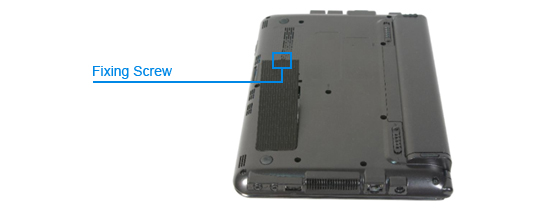
1. Remove the fixing screw on the memory compartment cover on the bottom of the computer using a screwdriver.
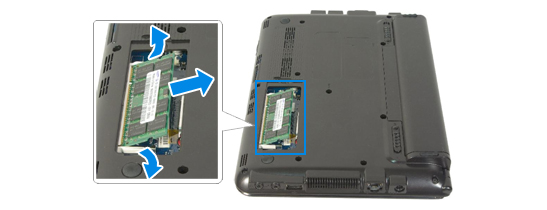
2. Pull the memory module latches outward. The memory module will pop up. Remove the memory out at an angle of 30 degrees.
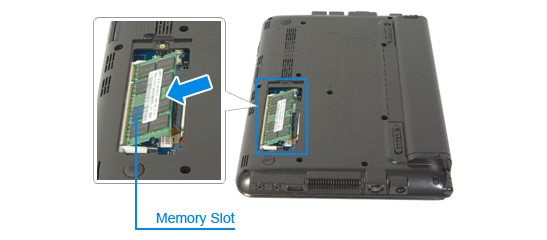
3. Insert a new memory module into the memory slot at an angle of approximately 30 degrees aligning it to the angle of the memory slot.
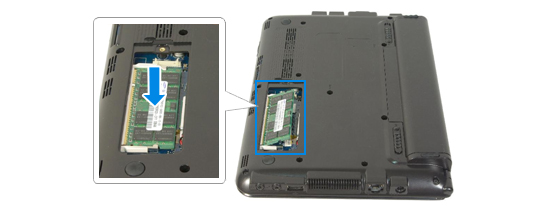
4. Push the memory module down so that it is completely fixed into place; if the memory does not fit easily push the memory module down while pulling the memory module latches outward.
5. Close the memory compartment cover and secure it with the screw.
Models |
NP-N145P NP-N150P NP-N210P NP-N220P |
|---|
If the above information does not match what your product is showing, you may check the User Manual for your product. If you are unable to solve the problem, please contact us for further assistance.
Thank you for your feedback!
Please answer all questions.
RC01_Static Content : This text is only displayed on the editor page