Galaxy S9/S9+ Main New features: Samsung DeX
Important Note: The information on this page is for Hong Kong products only. Models, sequences or settings will vary depending on location and/or where the product had been purchased. To be redirected to your local support page please click here.
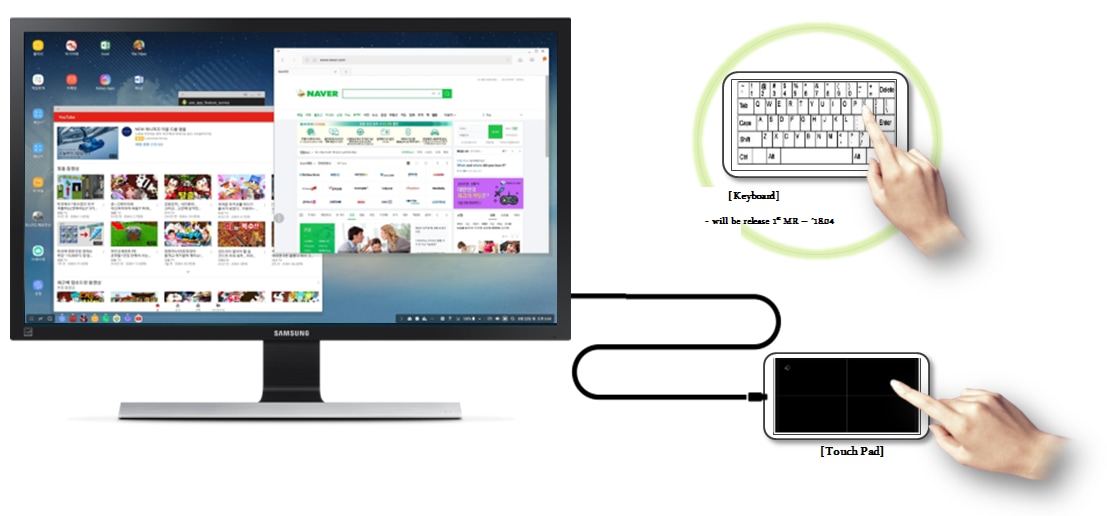
Simple and easy Usability without Peripheral Device
•Using the phone Screen as an interface to replace keyboard and mouse.
- Touchpad
- Keyboard (will be released through MR)
Support Multi-Resolution and Full screen Game Experience
•Support HD+, Full HD & WQHD display resolution
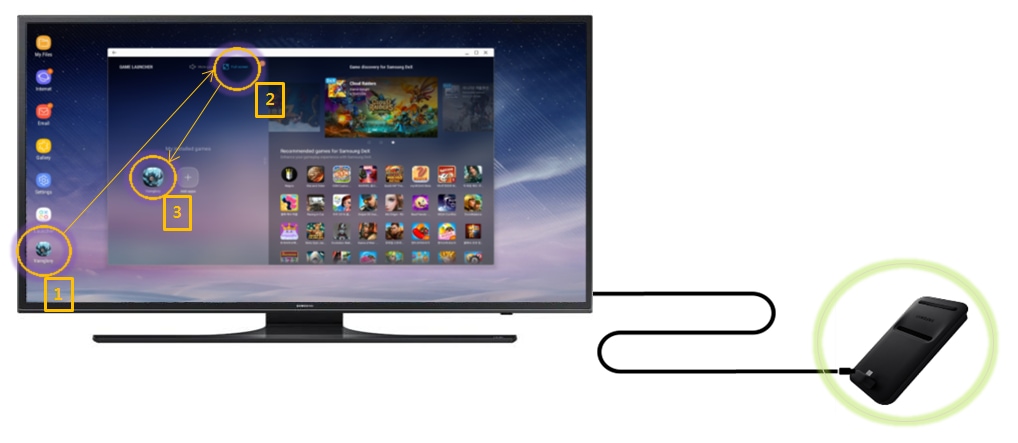
•Immersive mobile game experience with Full screen through Game Launcher App as below
1. Activate “Game Launcher” App
2. Enable “Full Screen” Mode on top of the window
3. Select the game
* Using the original HDMI cable and charger included with DeX Pad is recommended.
* DeX Pad, accessories, and monitor sold separately.
* Available on selected Samsung smartphones running Android 8.0+.
Some of the above are virtual images. Virtual Images and Pictures/Images are for reference only.
Now you can directly search for useful User Guide on the Samsung Members app preinstalled on Galaxy S9/S9+. Please try now.
Notice:
All functionality, features, specifications and other product information provided in this website including,
but not limited to, the benefits, design, pricing, components, performance, availability, and capabilities of
the product are subject to change without notice or obligation. Samsung reserves the right to make changes
to this website and the product described herein, at any time, without obligation on Samsung to provide notification of such change.
If the above information does not match what your product is showing, you may check the User Manual for your product. If you are unable to solve the problem, please contact us for further assistance.
Thank you for your feedback!
Please answer all questions.
RC01_Static Content : This text is only displayed on the editor page