How do I Disconnect Gear Fit2 from a Mobile Device?
Important Note: The information on this page is for Hong Kong products only. Models, sequences or settings will vary depending on location and/or where the product had been purchased. To be redirected to your local support page please click here.
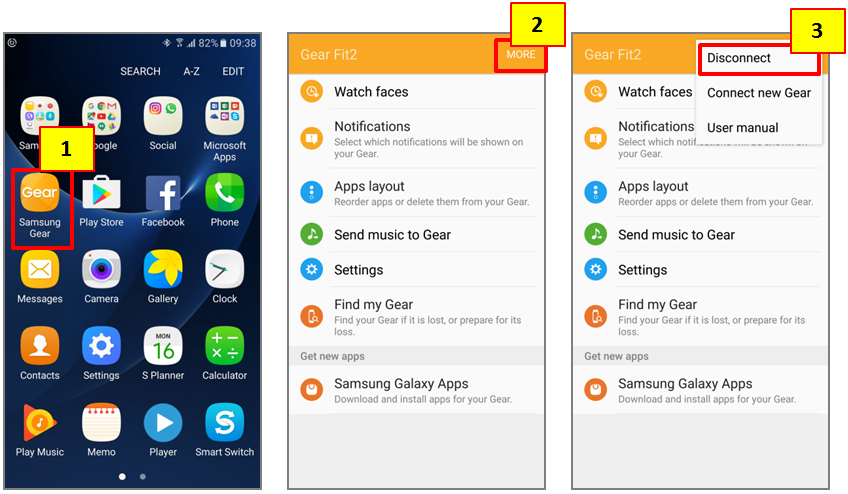
To disconnect the Gear from a mobile device, please follow the steps below.
1. On the Apps screen of the mobile device, tap Samsung Gear
2. Tap MORE
3. Tap Disconnect
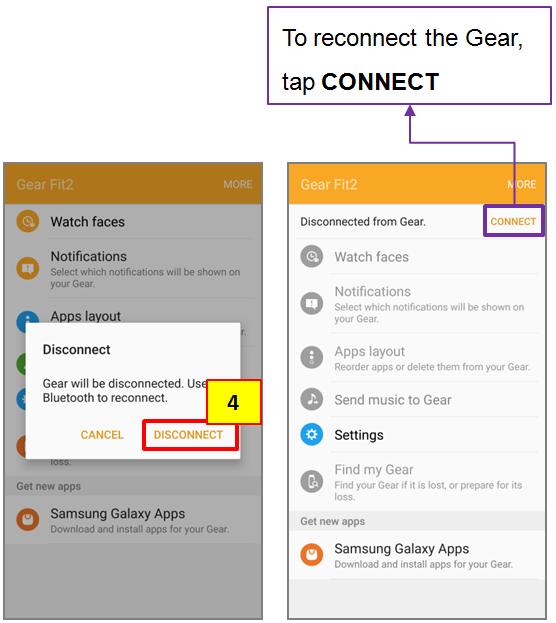
4. Tap DISCONNECT
5. The Gear will be disconnected from your mobile device. Please tap “CONNECT” if you want to reconnect the Gear.
Screen Images are for reference only. Google+, Google, the Google logo, Google Search, Google Maps, Gmail, YouTube, Android, Google Play and Messenger are the trademarks of Google Inc. All other products and services mentioned may belong to their respective trademark owners.
If the above information does not match what your product is showing, you may check the User Manual for your product. If you are unable to solve the problem, please contact us for further assistance.
Thank you for your feedback!
Please answer all questions.
RC01_Static Content : This text is only displayed on the editor page