How to Use Jog Controller on my Samsung TV?
Important Note: The information on this page is for Hong Kong products only. Models, sequences or settings will vary depending on location and/or where the product had been purchased. To be redirected to your local support page please click here.
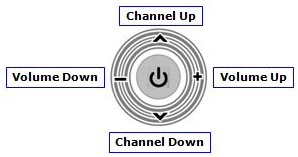
When you are watching TV or movies, the following Jog Controller is shown.
If you press the central part of the above Jog Controller, the following Controller will appear for more options.
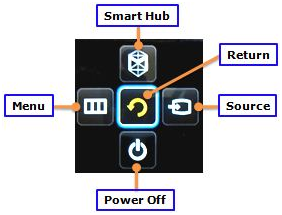
Smart Hub : Opens up Smart Hub
Return : Brings back to TV viewing
Source : Changes the source
Power Off : Turns TV off
Menu : Opens up the TV Menu
You can use the jog control by pressing the Power button at the back of your TV.
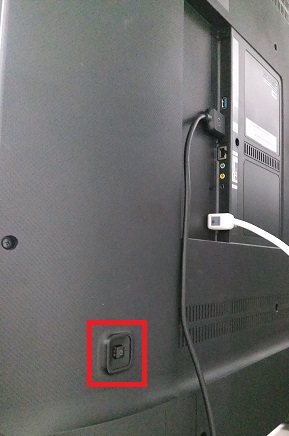
Note: This function is available on Samsung TV Series F, H, and J. Old TV models do not support Jog Controller.
Samsung TV: What is Jog Controller?
The Jog Control feature is a quick and easy way to enable and access certain functions and features on your Samsung TV without a remote control. This control is located on the rear or bottom right side of the TV and will feel like a little joystick. Move the Jog controller towards the icons indicated on the sides to control channel and volume. Press and hold the Jog controller to turn off the TV.
If the above information does not match what your product is showing, you may check the User Manual for your product. If you are unable to solve the problem, please contact us for further assistance.
Thank you for your feedback!
Please answer all questions.
RC01_Static Content : This text is only displayed on the editor page