What Is The Color Space Setting?
Important Note: The information on this page is for Hong Kong products only. Models, sequences or settings will vary depending on location and/or where the product had been purchased. To be redirected to your local support page please click here.

What Is The Color Space Setting?
Color Space is an option available in advanced settings in Picture option of Samsung TV. Color space refers to the range of color that the Samsung TV supports.
This is a chart explaining the different color gamut's. There are three points to a color gamut Red, Green, and Blue that show how much of that color spectrum the unit can support.
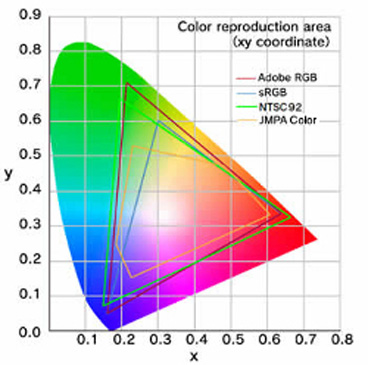
Settings in the Color Space Option
External devices connecting to the TV or a signal may support a different color gamut than the TV. If a device or signal is sending a different color gamut and the TV is expanding that range to the TV's full color range this will change the saturation of the colors and could enhance or degrade the picture. The color space option has two settings.
• Native: This will expand all incoming signals to the native color gamut of the TV, this can enhance the colors or over saturate them.
• Auto: The TV will adjust the display gamut to match the incoming signal to prevent any over saturation of the colors.
• Custom: It sets your own parameters. Reset the custom mode if you are unsatisfied with the results.
If the above information does not match what your product is showing, you may check the User Manual for your product. If you are unable to solve the problem, please contact us for further assistance.
Thank you for your feedback!
Please answer all questions.
RC01_Static Content : This text is only displayed on the editor page